Artificial intelligence has changed the way people communicate with technology. Instead of searching through dozens of websites, reading long documents, or navigating complicated software, users can now ask questions in natural language and receive useful answers within seconds. One of the most convenient ways to access this technology is through an AI chat box app.
An AI chat box app can act as a digital assistant for answering questions, generating ideas, writing content, explaining difficult topics, summarizing information, helping with coding, translating text, and performing many other everyday tasks. As AI technology continues to improve, these applications are becoming useful for students, professionals, businesses, content creators, developers, teachers, and ordinary internet users.
In this guide, we will explore what an AI chat box app is, how it works, its major features, benefits, limitations, practical uses, and important factors to consider before choosing one.
If you want to learn more about using AI chat tools without paying, check out our Free AI Chat Box guide.
What Is an AI Chat Box App?
An AI chat box app is a software application that allows users to communicate with an artificial intelligence system through a conversational interface. Instead of using traditional menus or complicated commands, users can type questions or instructions into a chat box.
The AI then processes the request and generates a response based on its underlying model and available information.
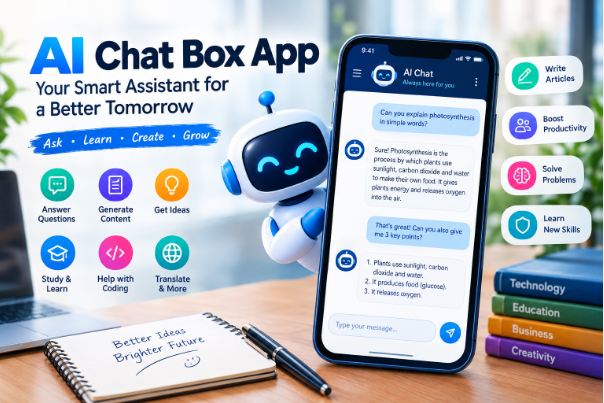
For example, a user might type:
“Explain photosynthesis in simple words.”
The AI chat application can respond with an easy-to-understand explanation. A student could then ask another question without starting a completely new search.
This conversational approach makes AI tools easier to use because users can continue the discussion, ask follow-up questions, request corrections, or change the style of an answer.
How Does an AI Chat Box App Work?
Most modern AI chat applications use large AI models that have been trained to understand and generate human language. Although the technology behind these systems is complex, the basic process is relatively simple from the user’s perspective.
1. User Enters a Prompt
Everything starts when a user enters a question, instruction, or request into the chat box.
The prompt could be something simple such as:
- “Write an email.”
- “Explain this lesson.”
- “Give me business ideas.”
- “Summarize this paragraph.”
- “Help me write Python code.”
2. AI Processes the Request
The application sends the prompt to its AI model. The model analyzes the words, context, and intent of the request.
Modern AI systems can often understand conversational context, which allows users to ask follow-up questions without repeating everything.
3. The Model Generates a Response
The AI generates a response based on patterns and information learned during training and, depending on the application, information available through connected tools or the internet.
4. The Response Appears in the Chat
The generated answer is displayed inside the conversation. Users can then continue asking questions or modify their instructions.
This creates an interactive conversation rather than a simple question-and-answer search experience.
Key Features of an AI Chat Box App
Different applications offer different capabilities, but many AI chat tools share several useful features.
Natural Language Conversations
The biggest advantage of an AI chat box app is its ability to communicate using natural language.
You do not necessarily need to know special commands. You can simply describe what you want.
For example:
Traditional software:
Users may need to understand menus and settings.
AI chat application:
Users can say, “Create a simple study plan for my English exam.”
This makes AI technology accessible to a much wider audience.
Question Answering
AI chat apps can answer questions across many subjects. Users can ask about technology, education, writing, mathematics, science, business, travel, programming, and everyday topics.
However, users should verify important information because AI-generated answers can sometimes contain mistakes.
Content Generation
Many AI chat applications can help create different types of content, including:
- Blog ideas
- Articles
- Emails
- Social media posts
- Product descriptions
- Headlines
- Outlines
- Stories
- Scripts
- Study notes
The quality of the result usually depends heavily on the instructions provided by the user.
Text Summarization
Long content can be difficult to read when time is limited. AI can help summarize information into shorter points.
For example, a user could provide a long article and ask the AI to identify:
- Main arguments
- Important facts
- Key conclusions
- Important terminology
This can be particularly useful for students and professionals.
Translation
Some AI chat applications can translate text between multiple languages.
Users can also request a specific style, such as formal, casual, academic, or conversational translation.
Coding Assistance
Developers can use AI chat tools to:
- Explain programming concepts
- Generate sample code
- Find possible bugs
- Explain error messages
- Convert code between languages
- Create documentation
- Suggest improvements
AI should be treated as an assistant rather than an unquestionable authority because generated code can contain errors or security problems.
Benefits of Using an AI Chat Box App
The popularity of AI chat applications comes from their ability to make many tasks faster and easier.
Saves Time
One of the most important benefits is speed.
Instead of spending a long time searching for information or creating a first draft from scratch, users can ask an AI application for assistance and then review the result.
For example, writing a basic professional email can take several minutes. An AI assistant can produce a starting draft almost instantly.
Improves Productivity
An AI chat box app can become a useful productivity assistant.
Users can ask it to create:
- To-do lists
- Meeting summaries
- Project ideas
- Study plans
- Writing outlines
- Brainstorming lists
This can reduce the amount of time spent on repetitive tasks.
Helps Students Learn
Students can use AI chat tools as learning assistants.
Instead of simply asking for an answer, students can request explanations.
For example:
“Explain Newton’s laws like I am a beginner and give me three examples.”
This approach can make difficult subjects easier to understand.
AI can also generate practice questions, quizzes, flashcards, and revision notes.
Supports Content Creators
Bloggers, social media managers, writers, and marketers can use AI applications during the content planning process.
An AI chat box app can help generate:
- Topic ideas
- Content outlines
- SEO keyword suggestions
- FAQs
- Social media concepts
- Headline variations
- Meta description ideas
Human editing remains important to ensure accuracy, originality, and a natural writing style.
Available Whenever You Need It
Unlike a human assistant, an AI application can usually be accessed whenever the service is available.
This makes it useful for people who need quick assistance outside traditional working hours.
AI Chat Box App for Students
Education is one of the areas where conversational AI can be particularly useful.
Students can use an AI assistant to understand difficult concepts instead of simply searching for definitions.
For example, a student studying biology could ask:
“Explain the difference between mitosis and meiosis in a simple comparison.”
The AI could provide an explanation and comparison table.
Students can also use AI to create practice exercises.
Useful Student Tasks
An AI chat application can help with:
- Grammar practice
- Vocabulary building
- Essay planning
- Mathematics explanations
- Science concepts
- Revision notes
- Quiz generation
- Presentation ideas
- Study schedules
- Language practice
However, students should use AI as a learning tool rather than submitting AI-generated work as their own when academic rules prohibit it.
AI Chat Box App for Businesses
Businesses are also using conversational AI for a variety of tasks.
Customer support is one major example. AI-powered chat systems can answer frequently asked questions and guide customers toward relevant information.
Businesses can also use AI internally.
Common Business Applications
An AI chat box app can assist with:
- Customer service
- Marketing ideas
- Business planning
- Email drafting
- Market research
- Internal documentation
- Product descriptions
- Sales scripts
- Meeting summaries
- Employee training materials
For companies, privacy and data protection are especially important. Sensitive business information should not be entered into an AI service unless the organization understands how that information is handled.
AI Chat Box App for Content Writers
Content writers can use AI throughout the writing process without allowing it to replace their own judgment.
A writer might use AI to brainstorm ten article topics, select one, develop an outline, and then write the article independently.
AI can also help identify weaknesses in an existing draft.
For example, a writer can ask:
“Make this paragraph clearer without changing its meaning.”
This can be useful for editing and improving readability.
AI and SEO Content
For SEO professionals and bloggers, an AI chat application can assist with:
- Keyword research brainstorming
- Search-intent analysis
- Article structures
- FAQ ideas
- Title variations
- Meta descriptions
- Internal-link ideas
- Content gap brainstorming
However, SEO success depends on much more than inserting keywords into an article. Helpful content, strong site structure, technical SEO, user experience, credibility, and search intent all matter.
AI Chat Box App vs Traditional Search
Traditional search engines and AI chat applications are not exactly the same.
A search engine generally provides a list of webpages that may contain the information you need.
An AI chat application generally attempts to provide a direct conversational response.
Traditional Search
You might search:
“How does cloud computing work?”
You receive multiple search results and choose websites to read.
AI Conversation
You could ask:
“Explain cloud computing to me like I am a beginner.”
The AI provides an explanation and allows you to continue the conversation.
Both approaches can be useful. Search engines are often better when you need to discover original sources, while conversational AI can be useful for explanations, brainstorming, summarization, and interactive learning.
What Makes a Good AI Chat Box App?
Not every AI chat application provides the same experience. Before selecting one, consider several factors.
1. Response Quality
The quality of answers should be one of the first considerations.
A good application should understand context and provide useful, relevant responses.
2. Speed
Fast responses create a smoother experience, particularly when users ask multiple follow-up questions.
3. Ease of Use
The interface should be simple enough for beginners.
A clean chat box, readable responses, and easy conversation management can significantly improve usability.
4. Accuracy
AI systems can make mistakes. A quality application should provide useful information while making it easier for users to verify important claims.
5. Privacy
Users should understand how their conversations and uploaded information are handled.
Avoid sharing passwords, financial information, confidential business documents, or other highly sensitive information unless you fully understand the application’s privacy practices.
6. Supported Features
Some applications may support only text conversations, while others can handle images, documents, voice, coding, web information, or other types of input.
Choose features according to your actual needs.
How to Write Better Prompts for an AI Chat Box App
The quality of an AI response often depends on the quality of the prompt.
A vague request may produce a generic answer.
For example:
Weak prompt:
“Write an article about technology.”
Better prompt:
“Write a beginner-friendly 1,500-word article explaining how artificial intelligence is changing education. Use clear headings, examples, and a balanced tone.”
The second prompt gives the AI more useful instructions.
Include the Desired Audience
Tell the AI who will read the content.
For example:
“Explain this topic for high school students.”
Specify the Format
You can request:
- Bullet points
- Tables
- Step-by-step instructions
- Short paragraphs
- FAQs
- An article
- A script
Explain the Tone
You can ask for:
- Professional
- Friendly
- Academic
- Simple
- Conversational
- Persuasive
Provide Context
The more relevant context you provide, the more useful the response can become.
Common Uses of an AI Chat Box App
The possibilities are extensive. Here are some popular applications.
Personal Productivity
Users can ask AI to organize tasks, brainstorm ideas, create checklists, and simplify complicated information.
Education
Students and teachers can use conversational AI for explanations, exercises, lesson ideas, and revision materials.
Writing
Writers can use AI for brainstorming, editing, rewriting, and creating initial drafts.
Programming
Developers can use AI for code explanations, debugging assistance, documentation, and learning programming concepts.
Customer Support
Companies can integrate conversational AI into websites and applications to answer common customer questions.
Marketing
Marketing teams can use AI to brainstorm campaigns, write draft copy, develop customer personas, and generate content ideas.
Language Learning
AI can provide conversation practice and help learners understand vocabulary and grammar.
Advantages and Disadvantages of AI Chat Box Apps
AI chat applications offer significant benefits, but they also have limitations.
Advantages
- Fast responses
- Easy communication
- Available across many devices
- Helpful for brainstorming
- Can explain complicated concepts
- Supports writing tasks
- Can improve productivity
- Useful for learning
- Helps with repetitive work
Disadvantages
- May generate incorrect information
- Can misunderstand complex instructions
- May produce repetitive content
- Quality varies between applications
- Privacy can be a concern
- Users can become overly dependent on AI
- Generated code or advice may require expert review
Understanding these limitations helps users make better decisions.
Is an AI Chat Box App Free?
Some AI chat applications offer free plans, while others use paid subscriptions.
Free versions may provide access to basic conversational features but can have limitations involving:
- Usage limits
- Advanced models
- File uploads
- Image capabilities
- Response speed
- Premium features
Paid plans may provide additional capabilities.
The best option depends on how frequently you use the application and which features you actually need. A casual user may not need a premium subscription, while a professional using AI every day may benefit from advanced capabilities.
AI Chat Box Apps on Mobile Devices
Mobile AI applications have made conversational AI more convenient.
Instead of opening a desktop website, users can access an AI assistant directly from a smartphone or tablet.
Mobile applications may support features such as:
- Text conversations
- Voice input
- Image uploads
- Document analysis
- Notifications
- Conversation history
This makes AI assistance useful while traveling, studying, working, or completing everyday tasks.
AI Chat Box Apps and Voice Interaction
Voice interaction is becoming an important part of conversational AI.
Instead of typing every question, users can speak naturally.
For example, someone cooking could ask:
“What can I make with eggs, tomatoes, and potatoes?”
A voice-enabled AI assistant can respond without requiring the user to type.
Voice interaction may also make AI more accessible for people who find typing inconvenient.AI Chat Box Apps and Privacy
Privacy should never be ignored when using AI applications.
A conversation can sometimes contain information that users would not want exposed or retained.
Before using an AI chat service, check its privacy policy and understand how your data is handled.
Avoid Sharing Highly Sensitive Information
Users should generally avoid entering information such as:
- Passwords
- Banking credentials
- Private authentication codes
- Confidential company information
- Sensitive personal documents
- Private customer records
Responsible AI use starts with responsible data handling.
Can an AI Chat Box App Replace Human Workers?
AI can automate many tasks, but that does not mean it can completely replace human expertise in every situation.
AI is good at processing language, generating drafts, recognizing patterns, and assisting with repetitive tasks.
Humans remain essential for:
- Judgment
- Creativity
- Leadership
- Emotional understanding
- Ethical decisions
- Real-world experience
- Accountability
The most effective approach is often to use AI as an assistant that helps people work more efficiently.
The Future of AI Chat Box Apps
The future of conversational AI is likely to involve more advanced interactions.
AI chat applications may increasingly combine:
- Text
- Voice
- Images
- Video
- Documents
- Real-time information
- Personalized assistance
- Automated workflows
Instead of simply answering questions, future AI assistants may help users complete entire tasks.
For example, an assistant could potentially help a user plan a project, organize information, draft documents, analyze data, and coordinate multiple steps.
As these technologies become more capable, responsible use will become increasingly important.
Tips for Getting Better Results
If you want to get more useful answers from an AI chat box app, follow these simple practices.
Be Specific
Tell the AI exactly what you want.
Give Relevant Context
Explain the situation and provide information needed to complete the task.
Request a Format
Tell the AI whether you want paragraphs, bullets, a table, or another structure.
Ask Follow-Up Questions
You do not have to accept the first answer. Continue the conversation and ask the AI to clarify or improve it.
Verify Important Information
Always double-check information related to legal, financial, medical, academic, professional, or other high-stakes decisions.
Edit AI-Generated Content
If you use AI for writing, review and personalize the result before publishing or submitting it.
Frequently Asked Questions About AI Chat Box Apps
What is an AI chat box app?
An AI chat box app is software that allows users to communicate with an artificial intelligence system through conversational messages. It can answer questions, generate text, explain concepts, and assist with many tasks.
Is an AI chat box app the same as a chatbot?
They are related but not always identical. A traditional chatbot may follow predefined rules, while modern AI chat applications often use advanced language models that can generate dynamic responses.
Can students use AI chat apps?
Yes. Students can use them for learning, explanations, practice questions, brainstorming, and revision. They should follow their school’s or institution’s rules regarding AI use.
Can AI chat apps write articles?
Many AI chat applications can generate article drafts, outlines, introductions, FAQs, and other content. Human review is important for accuracy, originality, quality, and useful firsthand insight.
Are AI chat applications accurate?
They can provide highly useful information, but they are not guaranteed to be correct. Important claims should be verified using reliable sources.
Can AI chat apps help with coding?
Yes. Many can explain code, generate examples, identify potential errors, and help users learn programming.
Do AI chat apps work on smartphones?
Many modern AI chat services offer mobile-friendly websites or dedicated applications, although available features vary by provider.
Are AI chat apps free?
Some offer free access, while others provide premium subscriptions or usage-based plans. Features and limits differ between services.
Final Thoughts on AI Chat Box Apps
An AI chat box app can be much more than a tool for answering questions. It can serve as a learning assistant, writing partner, brainstorming tool, coding helper, productivity assistant, and conversational interface for accessing AI technology.
The biggest advantage is simplicity. Users can communicate with advanced AI using ordinary language instead of learning complicated commands or software interfaces.
At the same time, AI should be used thoughtfully. Generated responses can contain errors, and users should not blindly trust AI for important decisions. Privacy, fact-checking, human judgment, and responsible use remain essential.
As artificial intelligence continues to evolve, AI chat box apps are likely to become an increasingly common part of everyday digital life. Whether you are a student looking for help with a difficult topic, a writer developing new ideas, a developer solving a coding problem, or a business searching for ways to improve productivity, conversational AI can provide valuable assistance when used correctly.
In short, an AI chat box app brings powerful artificial intelligence into a simple conversational experience—and that combination is helping redefine how people interact with technology.

Hello! I am Sardar Sharjeel Ahmed. I have been working as a content writer since 2022, creating informative, engaging, and easy-to-understand content for websites.
My academic background in Physics has developed my research, analytical, and problem-solving skills, which I use in my writing. I enjoy researching different topics and turning complex information into clear and useful content for readers.
Through my writing, I aim to share accurate, valuable and well-researched information while continuously improving my knowledge and writing skills. I have a particular interest in technology, education, science, digital trends, and general informational content.